How do you analyze a soccer kick with a phone?
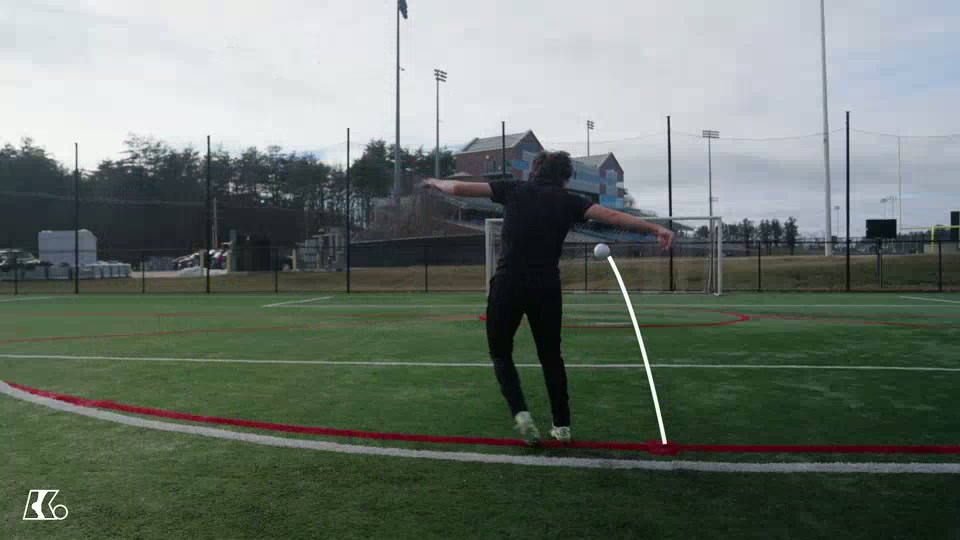
Put your phone on a tripod to the side of the ball's path, record five attempts at the same drill, and review the plant, contact, finish and where each ball started and arrived. Change one thing and record five more. A soccer kick analysis app such as KickMap AI handles the recording and the ball-flight analysis in one step, so you can track the same drill across weeks.
Most players practice blind. They feel a kick was good or bad, but by the next attempt the detail is gone. Your phone fixes that. All you need is a smartphone and a soccer ball, and every kick can teach you something.
This guide shows you how to film usefully, what to look for, and how KickMap AI turns those clips into a record you can actually compare.
What a phone shows you
Replay shows what you miss at full speed: a rushed approach, a plant foot landing too far away, falling off balance, or a ball that keeps starting left of the target.
One camera gives you a flat view, so angles can look different from different spots, and a blurred frame can hide impact. Video won't tell you how hard you hit the ball or how fast it spun. Write down what you see, and keep it separate from what you think caused it.
Set up a repeatable view
- Keep it still: use a tripod on level ground, out of the run-up, retrieval and ball-flight lanes, and away from goals that could take a shot.
- Angle and distance: for technique, film side-on from far enough back to see the whole approach, both feet and the follow-through. Check the frame with one gentle test kick. Don't mix camera angles inside the same comparison.
- Light and framing: film in even daylight, never into the sun, with a clean lens. Avoid digital zoom; it shrinks the ball into a blur.
- Frame rate: 60 fps, where your phone offers it, catches more of a fast swing in good light. For analysis, use the settings KickMap AI asks for.
- The flight lane
- Frame the launch and the arrival, with the phone well out of the ball's path.
- A broad target
- Leave open space behind it for misses and retrieval.
- Tripod to the side
- Side-on works well for technique. For app analysis, follow the setup steps in KickMap AI.
Film, then review
- Pick one task. Choose the foot, target, distance and type of strike. Warm up with easy passes first.
- Record a baseline. Five controlled attempts, misses included, without moving the phone.
- Watch at normal speed. Look at rhythm and balance first, then slow it down.
- Compare the same moments. Plant, contact and finish across all five. If contact falls between frames, note it.
- Test one cue. Make one small change, record five more and compare. Keep the first clips: memory turns an average kick into a perfect one.
- 1 · Plant
Where does the support foot land?
- 2 · Contact
Can you actually see impact?
- 3 · Finish
Are you balanced after the strike?
Five things to watch
- Plant foot
- Does it land beside the ball with room to swing, and in the same spot each time? Reaching for the ball usually shows up here first.
- Contact
- Can you see the striking surface meet the ball with a firm ankle? If the frame is hidden, mark it as unclear.
- Swing
- Is it smooth from the approach, or a last-second stab? Fix rhythm before you chase power.
- Follow-through
- Does the leg carry on naturally while you stay balanced? It tells you about the whole movement.
- Body alignment
- Compare your approach line, lean and hips with the direction you wanted the ball to start.
Read the ball's flight
Ask three questions about every kick: where did it start, how did it travel, and where did it arrive? Count target hits and note repeat misses: left, right, high or short. A pattern is a question worth testing. For passes, a good arrival includes the right pace; for shots, a hit target beats raw speed.
Keep a short log: date, foot, drill, distance, target size, hits out of attempts and one note. Record the ball, surface and wind too. A strong tailwind can look like improvement.
Let KickMap AI do the tracking
Filming and logging by hand works, but most players stop after a week. KickMap AI removes the friction. The free app records your kicks and uses computer vision to analyze what the ball did, so the clip and the result stay together.
KickMap AI is designed to estimate ball speed, trajectory, curve in degrees (°) and launch angle from your recording. Because every session sits in one place, you can compare the same drill across weeks instead of relying on memory. It shows the ball's behavior after contact; your clips and your coach still explain the technique behind it.
A real session, step by step
Here's how one 20-minute session might go for a player whose driven passes keep drifting left.
- Baseline. Phone on a tripod, side-on. Five right-foot driven passes at a two-cone gate 12 metres away. Result: two through the gate, three left.
- Review. On replay, the plant foot lands a little behind the ball on the three misses, and the hips open early.
- One cue. "Plant level with the ball." Five more passes from the same mark: four through the gate.
- Track it. Record both sets in KickMap AI, and log the hits and the cue in a note.
- Next week. Repeat the same drill and compare it with this session before changing anything else.
One cue, one comparison, one record. That's what turns filming into improvement.
Three drills to film
Drill 1:Passing: repeat the arrival
Set a two-cone gate at a comfortable distance. Film five inside-foot passes per foot and count gate hits and usable arrivals. Shorten the distance or widen the gate if you're new to it.
Drill 2:Shooting: starting line before power
Pick a broad zone in a safe goal with nobody behind it. Film five controlled shots from one mark, and count hits and starting-line misses separately. Test one cue at a time.
Drill 3:Set pieces: own the reset
Use a stationary ball and the same approach mark for five easy free kicks at an open target. Compare setup, starting line and finish. Add bend once the starting line is reliable.
A 20-minute routine
Pick one drill per session. Short on time? Trim the practice blocks, not the warm-up.
- 0–3 minWarm up; check the surface, target and camera frame.
- 3–6 minRecord a five-attempt baseline at comfortable effort.
- 6–9 minReview plant, contact and finish; choose one cue.
- 9–14 minRepeat the drill with that cue, resetting between kicks.
- 14–18 minIf it's working, add one small challenge, such as a narrower gate.
- 18–20 minCool down, log the results and save one good clip and one miss.
Common filming mistakes: a cropped foot, a moving camera, dark slow motion, or a ball too small to see. Fix the shot before you change your technique.
Filming young players
Have an adult supervise, keep bystanders out of the lane, and stop for pain or fatigue. Ask before filming anyone else; for children, get parent or guardian consent and follow club safeguarding rules. Leave names, schools and locations out of shared clips, and check the app's privacy information before uploading.
Questions players ask
Do I need an app to analyze my kicks?
No. Your phone's camera, a target and a notebook already show a lot. An app like KickMap AI saves you the manual work: it records the kick and analyzes the ball's flight in one place, so tracking progress across weeks becomes realistic.
Is slow motion always better?
Not always. Higher frame rates catch more of a fast swing but need good light. A bright, sharp normal-speed clip beats a dark slow-motion one. For app analysis, use the recording settings KickMap AI asks for.
Can my phone measure how fast I kick?
Not by timing a replay. KickMap AI is designed to estimate ball speed from video recorded in its own setup. Treat any number as an estimate and compare it with your own earlier sessions under similar conditions.
Can video show exactly where I hit the ball?
Only if the impact frame is clear. The foot often hides the ball, and contact can happen between frames. If you can't see it, write "unclear" rather than guessing.
How often should I compare sessions?
Once a week works for most players. Repeat the same drill, distance and target so the comparison is fair, and look at whole sets rather than your single best kick.
Record to learn, not to collect highlight clips. A clear question, a fair comparison and one change at a time make every next kick more purposeful.